Announcement Management System
Complete guide for organization announcement management. Select a topic below to get started.
System Overview
Learn about the system features, user roles, and permissions.
Accessing the System
How to login and navigate to the announcement module.
Announcement View
Understanding the announcement interface and table layout.
Creating Announcements
How to create new announcements with date and time settings.
Editing Announcements
How to modify existing announcements.
Deleting Announcements
Process for removing announcements from the system.
Timezone Management
Handling timezone differences in announcement scheduling.
Redux State Management
Understanding the state management architecture.
API Integration
Backend API endpoints and data flow.
Troubleshooting
Solutions to common issues and problems.
System Overview
The Announcement Management System enables organizations to create, manage, and display time-sensitive announcements to users with proper scheduling and timezone handling.
Key Features
🌍 Multi-timezone Support
Automatic timezone detection and conversion for accurate scheduling.
📅 Date & Time Scheduling
Set precise start and end times for announcements.
📱 Responsive Design
Optimized for both desktop and mobile devices.
🎨 Dark/Light Mode
Theme support for better user experience.
🔄 Real-time Updates
Immediate UI updates after CRUD operations.
⏱️ Live Time Display
Current time display with user's timezone.
Technical Architecture
- React component-based UI library
- Redux for state management
- Day.js for date/time manipulation
- React DatePicker for date selection
- Lucide React for icons
- Redux Store for centralized state management
- Announcement Slice for dedicated state
- Async Thunks for API operations
- Loading States for better UX
- User actions trigger Redux actions
- Async thunks handle API calls
- Responses update Redux state
- Components re-render with updated state
Component Structure
- Receives organizationId and darkMode props
- Manages local state for form data
- Handles edit and delete operations
- Manages popup states for creation/editing
- Handles timezone detection and conversion
Accessing the Announcement System
How to access and navigate the announcement management interface.
- Access through main application navigation
- Navigate to Announcements section
- System requires organization ID for data isolation
- Announcements load automatically on access

- Component receives organization ID as parameter
- Optional dark mode theme support
- Automatically fetches existing announcements
- Sets up timezone detection and current time display
Announcement View Interface
Understanding the announcement management interface and table layout.
Main Interface Components
- Current time display in user's timezone
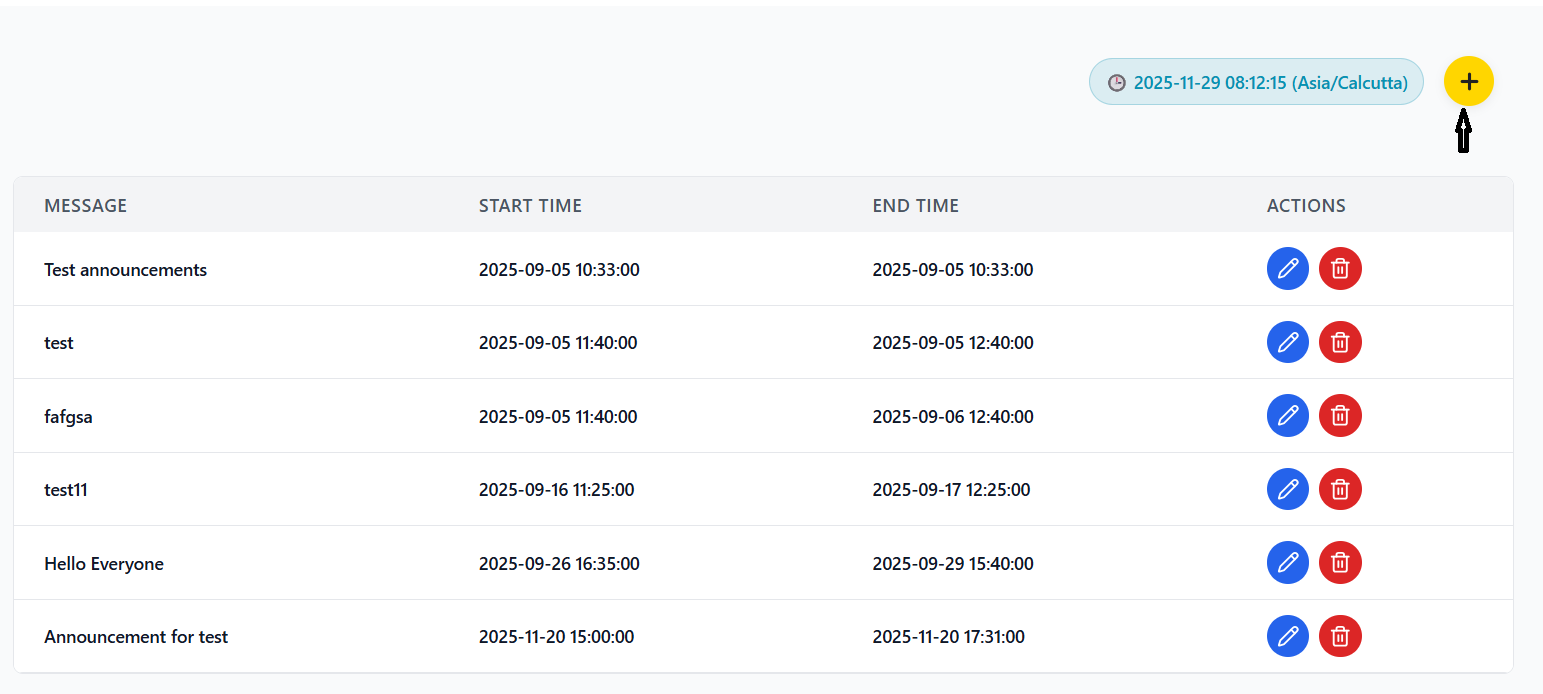
- Add button (yellow circular with plus icon)
- Loading and error status messages
- Real-time clock updates every second
- Message column showing announcement content
- Start Time column with formatted local time
- End Time column with formatted local time
- Actions column with edit and delete buttons
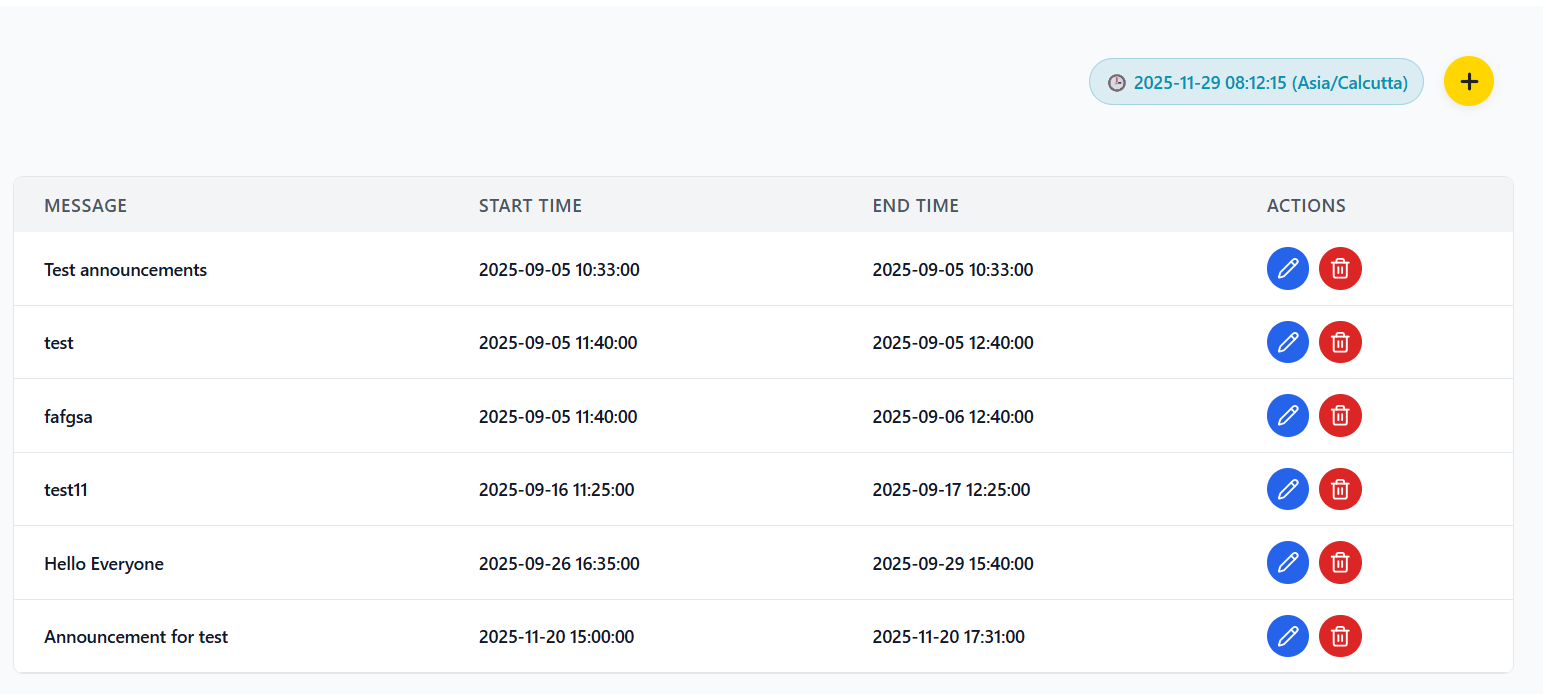
Table Columns Description
| Column | Description | Data Format |
|---|---|---|
| Message | The announcement content text | Plain text |
| Start Time | When the announcement becomes active | YYYY-MM-DD HH:mm:ss (local time) |
| End Time | When the announcement expires | YYYY-MM-DD HH:mm:ss (local time) |
| Actions | Edit (pencil) and Delete (trash) buttons | Interactive buttons |
Empty State
When no announcements exist, the table displays:
- Large envelope icon (📭)
- "No announcements found" message
- Prompt to create the first announcement
Creating Announcements
How to create new announcements with proper scheduling and timezone handling.
Creating Process
- Click the yellow circular "+" button in header
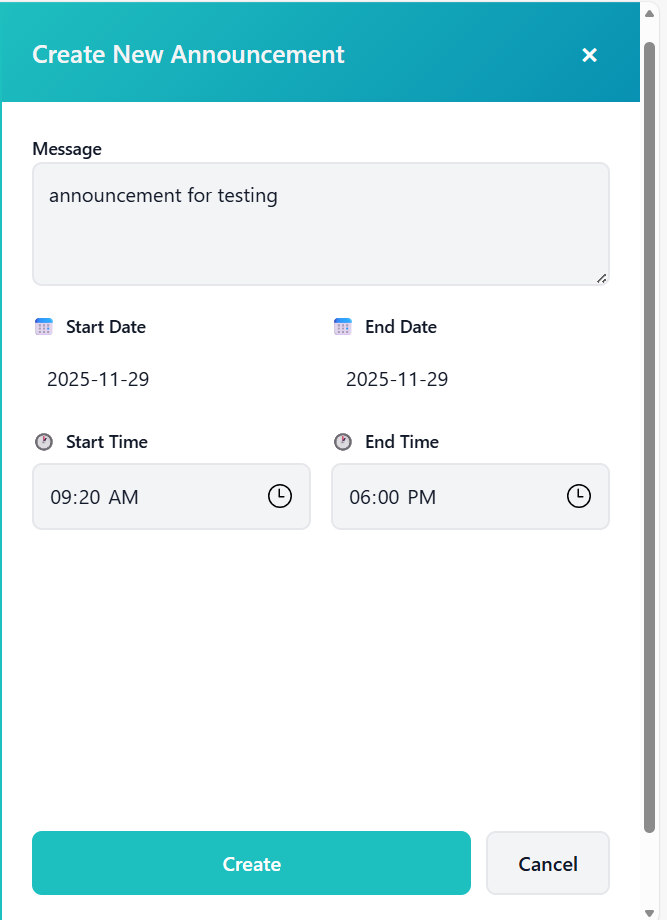
- Right-side panel slides in with creation form
- Form header shows "Create New Announcement"
- All fields start empty and ready for input
- Enter announcement text in message textarea
- Field is required (cannot be empty)
- Use clear and concise messaging
- Consider audience and purpose
- Use date picker or type YYYY-MM-DD format
- Calendar icon available for selection
- Field is required
- Cannot select past dates
- Use date picker or type YYYY-MM-DD format
- Field is required
- Must be equal to or after start date
- Cannot select past dates
- Use time input field (HH:MM format)
- Field is required
- Consider timezone implications
- Ensure logical time sequence
- Use time input field (HH:MM format)
- Field is required
- Should be after start time
- Consider announcement duration
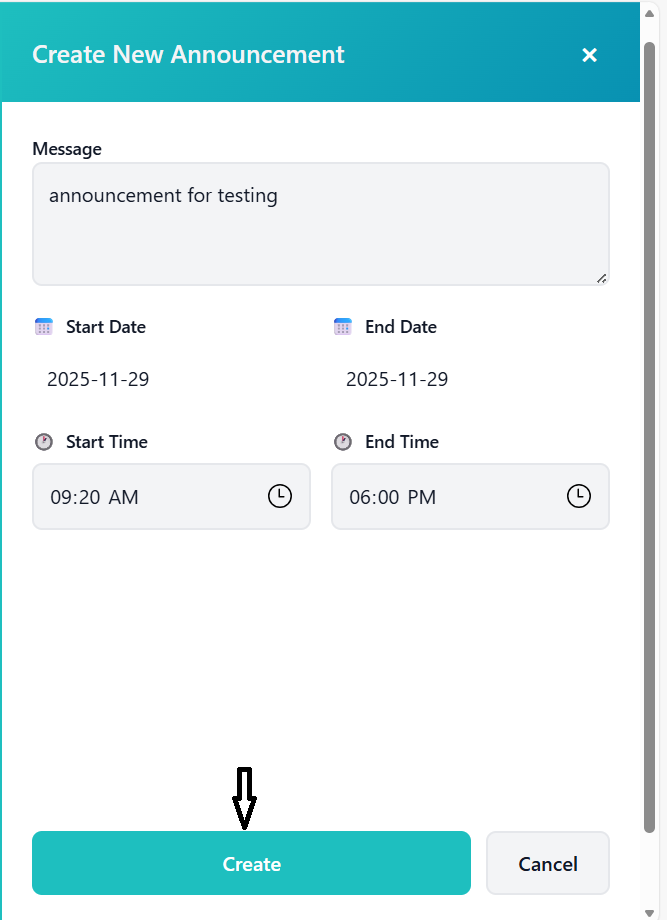
- Click green "Create" button at bottom
- System validates all required fields
- Dates and times convert to UTC for storage
- Loading overlay appears during processing
Data Processing Steps
- Combine selected date and time values
- Create complete datetime strings
- Handle missing or incomplete data
- Convert local datetime to UTC
- Use standardized UTC format
- Store in database as UTC
- Include announcement message
- Add organization ID
- Include UTC start and end times
- Prepare for API submission
Editing Announcements
How to modify existing announcements.
Editing Process
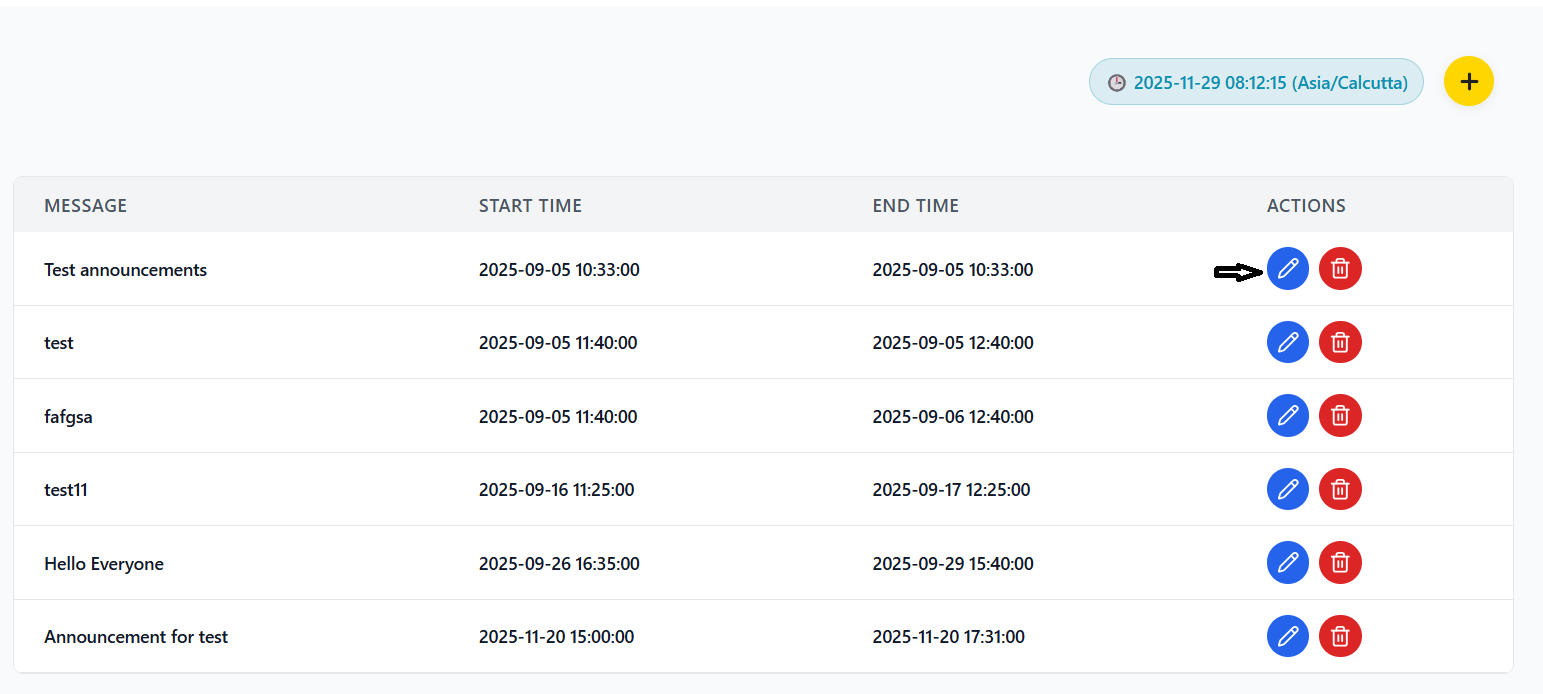
- Locate announcement to edit in table
- Click blue pencil icon in Actions column
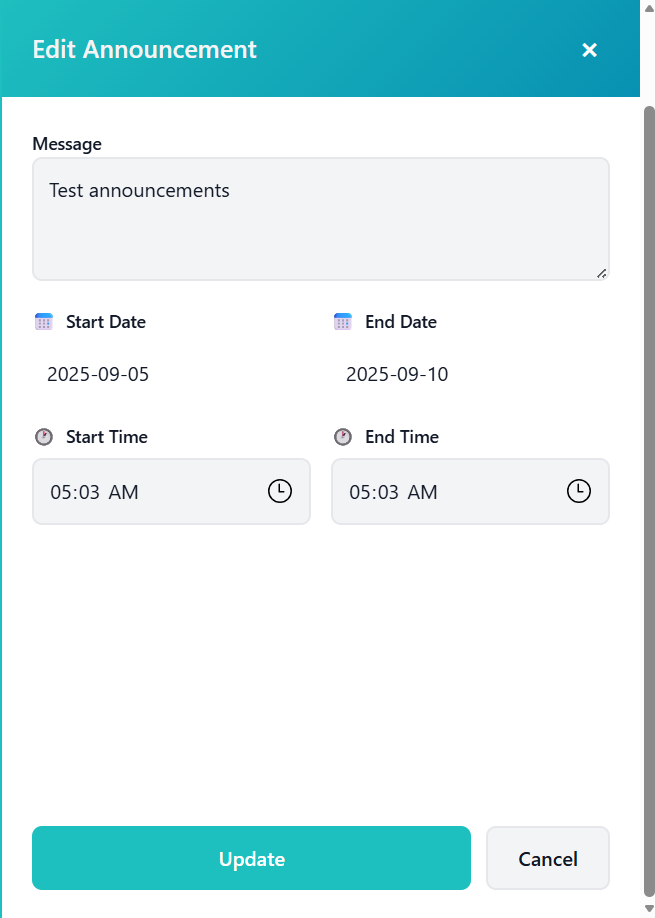
- Edit panel slides in from right
- Panel header shows "Edit Announcement"
- Form pre-populated with existing data
- Message field populated from existing data
- Start date extracted from stored UTC time
- End date extracted from stored UTC time
- Start time converted to local time display
- End time converted to local time display
- Edit any field as needed
- Same validation rules as creation
- All fields remain required
- Date restrictions still apply
- Click green "Update" button
- System performs validation checks
- Dates/times converted to UTC
- Update action dispatched to Redux
Deleting Announcements
Process for removing announcements from the system.
Deletion Process
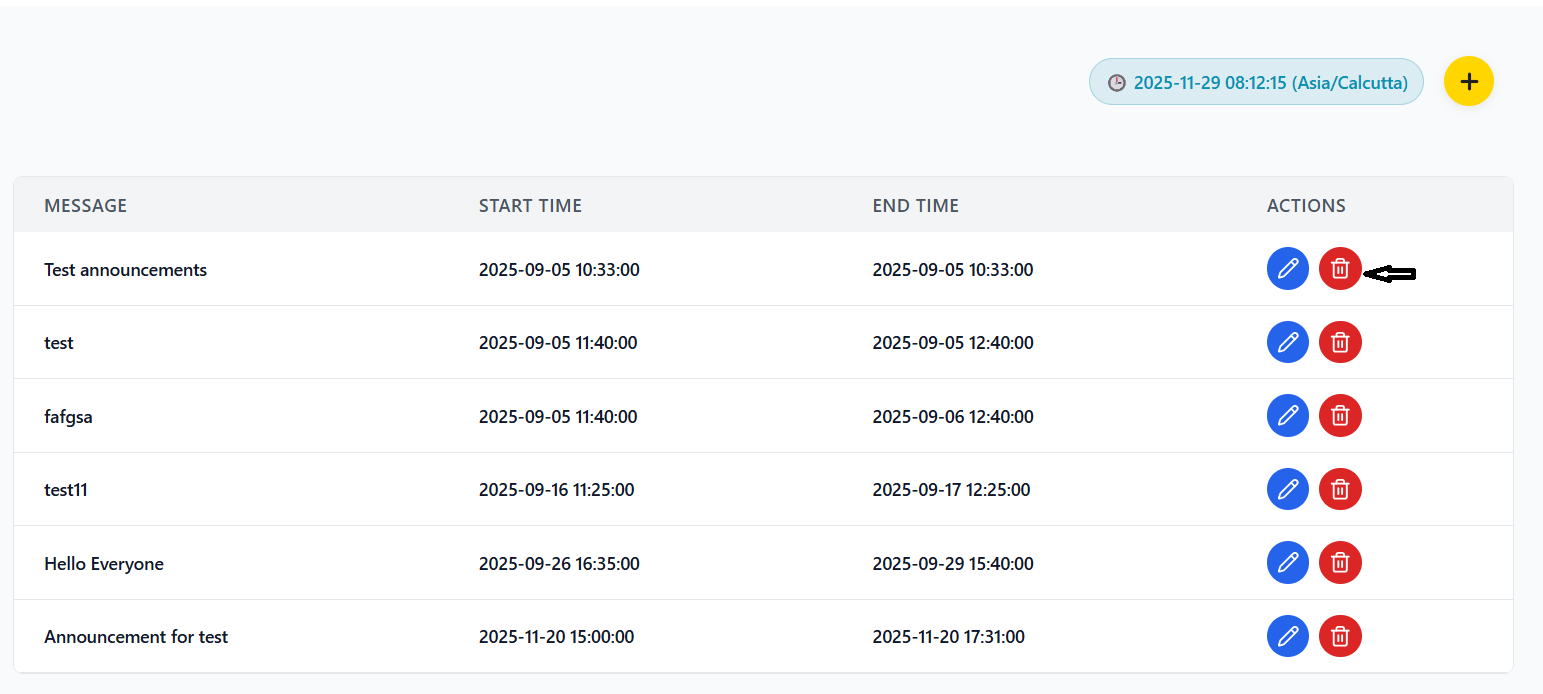
- Locate announcement to delete in table
- Click red trash icon in Actions column
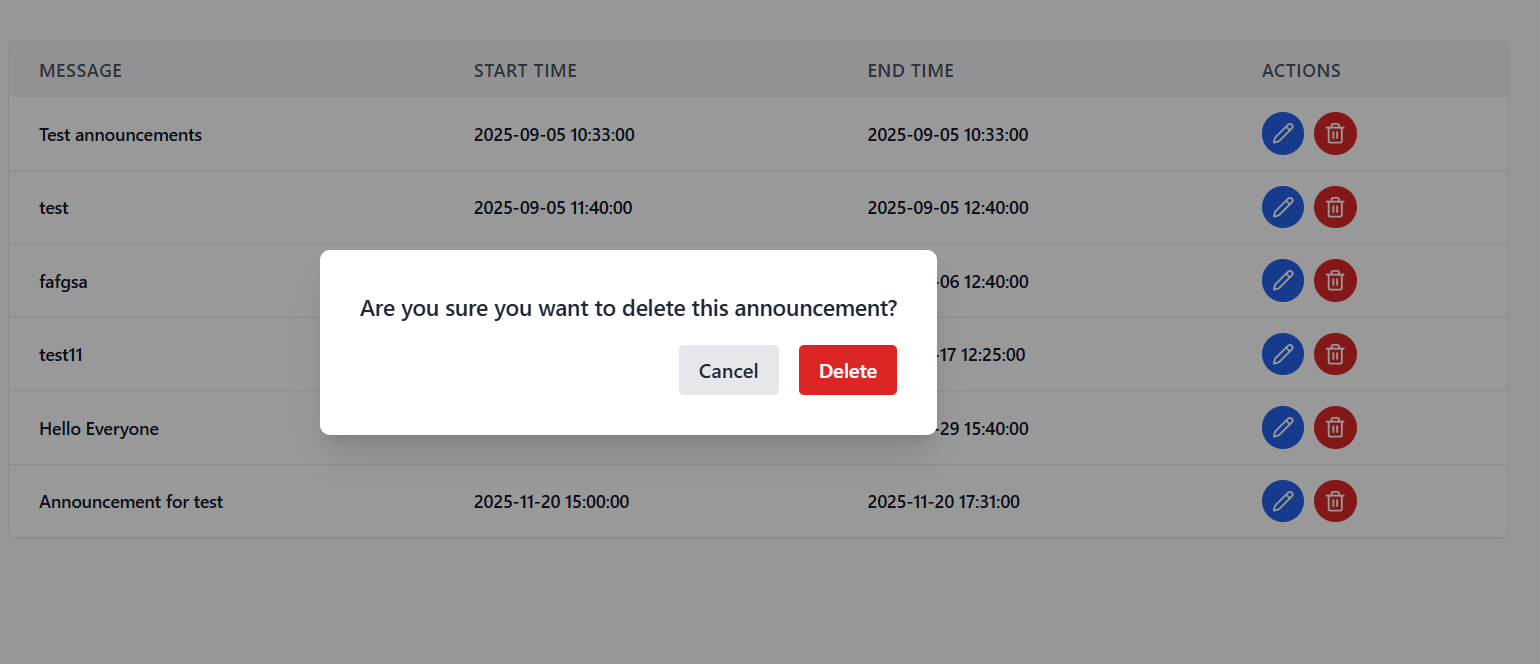
- Confirmation dialog appears immediately
- Dialog shows deletion confirmation message
- Cancel button (gray) - closes without action
- Delete button (red) - proceeds with deletion
- Semi-transparent overlay prevents accidental clicks
- Clear confirmation message displayed
- Click red "Delete" button in dialog
- Delete action dispatched immediately
- Announcement removed from database
- UI updates to reflect deletion
Deletion State Management
- deleteId - stores ID of announcement to delete
- showDeleteConfirm - controls confirmation dialog visibility
- Manages deletion confirmation flow
- Sets announcement ID for deletion
- Shows confirmation dialog
- Prevents accidental deletions
Timezone Management
Handling timezone differences in announcement scheduling and display.
Timezone Architecture
- Automatic detection using browser Intl API
- Fallback to Australia timezone if detection fails
- Timezone preference can be saved locally
- Real-time detection on component load
- Live clock showing current time in user's timezone
- Updates every second for accuracy
- Format: "YYYY-MM-DD HH:mm:ss (Timezone)"
- Displayed as badge in header section
- All times stored in UTC in database
- Automatic conversion to local time for display
- Conversion happens during data fetching
- Ensures consistent behavior across timezones
Date/Time Processing Flow
YYYY-MM-DD HH:MM
UTC Conversion
UTC in Database
Local Time Conversion
Local Time for User
- Users always see times in their local timezone
- Database stores consistent UTC times
- Automatic handling of daylight saving time
- No manual timezone calculations needed
Redux State Management
Understanding the state management architecture for announcements.
Redux Slice Structure
- items - array of announcement objects
- loading - boolean indicating API call status
- error - string containing error message if any
- fetchAnnouncements - get all announcements
- createAnnouncement - add new announcement
- updateAnnouncement - modify existing announcement
- deleteAnnouncement - remove announcement
- clearAnnouncementError - clear error state
Async Thunk Operations
- Component dispatches async thunk
- Redux sets loading state to true
- API makes HTTP request to backend
- Response returns data or error
- Redux updates state with response
- Component re-renders with new state
- Loading state triggers UI indicators
- Prevents duplicate submissions
- Provides visual feedback to users
- Automatically managed by Redux
Error Handling
- Errors stored in Redux state
- Displayed in UI with appropriate styling
- Can be manually cleared when needed
- Automatically cleared on successful operations
API Integration
Backend API endpoints and data flow for announcement management.
API Endpoints
| Endpoint | Method | Purpose | Parameters |
|---|---|---|---|
| /api/announcements | GET | Fetch announcements for organization | organizationId |
| /api/announcements | POST | Create new announcement | announcement object |
| /api/announcements/{id} | PUT | Update existing announcement | id, announcement object |
| /api/announcements/{id} | DELETE | Delete announcement | id |
Data Models
- id - unique identifier
- message - announcement content
- startTime - UTC start datetime
- endTime - UTC end datetime
- organizationId - organization identifier
- createdAt - creation timestamp
- updatedAt - last update timestamp
- message - required string
- startTime - required UTC datetime string
- endTime - required UTC datetime string
- organizationId - required string
Error Responses
| HTTP Status | Scenario | Response |
|---|---|---|
| 200 | Success | Requested data or success message |
| 400 | Bad Request | Validation errors or missing fields |
| 401 | Unauthorized | Authentication required |
| 403 | Forbidden | Insufficient permissions |
| 404 | Not Found | Resource doesn't exist |
| 500 | Server Error | Internal server error |
Troubleshooting Guide
Solutions to common issues and problems you may encounter.
Common Issues
Possible Causes:
- Network connectivity issues
- Invalid organization ID
- API server down or unreachable
- Authentication/authorization problems
Solutions:
- Check internet connection
- Verify organization ID is correct
- Check browser console for API errors
- Refresh the page (F5)
- Contact system administrator
Possible Causes:
- Required fields missing
- Invalid date/time format
- End date before start date
- API validation errors
Solutions:
- Fill all required fields (marked with *)
- Use date picker instead of manual entry
- Ensure end date/time is after start
- Check error message for specific issues
Possible Causes:
- Browser timezone detection failed
- Daylight saving time transitions
- Server timezone misconfiguration
Solutions:
- Check if browser supports timezone detection
- Verify system clock is correct
- Contact admin for server timezone check
- Use UTC for critical time-sensitive announcements
Possible Causes:
- Slow network connection
- Large announcement message
- API timeout
- Browser performance issues
Solutions:
- Wait for operation to complete (loading indicator)
- Check network speed
- Reduce announcement message length
- Refresh page and try again
- Clear browser cache
Error Message Reference
| Error Scenario | Possible Cause | Solution |
|---|---|---|
| "Network Error" | API unreachable | Check internet connection and API status |
| "Unauthorized" | Session expired or invalid credentials | Re-login to application |
| "Validation Failed" | Missing or invalid form data | Check all required fields are filled correctly |
| "Date in past" | Start/end date before current date | Select future dates only |
| "End before start" | End date/time before start | Adjust dates/times so end is after start |
Developer Tools
- Browser Console - check for JavaScript errors (F12)
- Network Tab - monitor API requests and responses
- Redux DevTools - inspect application state
- Local Storage - check for stored preferences
Contact Support
- Persistent errors after trying solutions
- System performance issues
- Feature requests or enhancements
- Data corruption or loss
Information to Provide:
- Browser and version
- Operating system
- Steps to reproduce the issue
- Error messages (screenshot if possible)
- Network conditions